Module 5 of 13 · Platform Walkthrough

Delegate Client Panel & Selection of Priorities

The attendee-facing side of the platform. Once everything is set up by the organizer (Modules 1–4), delegates and sponsors log in here to fill out their profile, complete their survey, set their investment priorities, tailor their agenda, and choose which strategic partners they want to meet. Every choice they make feeds the matching engine.

Audience: Delegates (this module) — sponsors covered in Module 6 Surface: Public client panel (logged-in attendee view) Prerequisite: An attendee account exists for this delegate

1. What the Client Panel Is For 00:00 – 00:25

The single web surface where attendees do everything the organizer needs them to do.

Narrator · 00:00 – 00:25 In this portion we review the client panel — the section on the web where delegates and sponsors log in to fill in their profile, their survey, tailor their agenda, and get information about the event.

This module walks the platform from a delegate's perspective. Module 6 covers the same shell from a sponsor's perspective. The two share the same architecture (Home, My Profile, content sections, Summit Info) but each attendee type sees different forms, different actions, and a different selection step — driven by the per-attendee-type rules set up earlier in Modules 2 and 3.

Narrator · 00:25 – 00:58 When everything is finished and the meetings are scheduled, they will also have access to their final itinerary. So logging in to this panel — in the role of a delegate — gives an overview of the event and location, greeting them, and the first thing they see on the home page is information about the event and the action steps we previously discussed about the deadlines and dates: what they should be doing in a given period of time.

2. Home — Welcome & Action Items 00:25 – 01:25

The home page is a personalized status page: where you are, what's left to do, when each item is due.
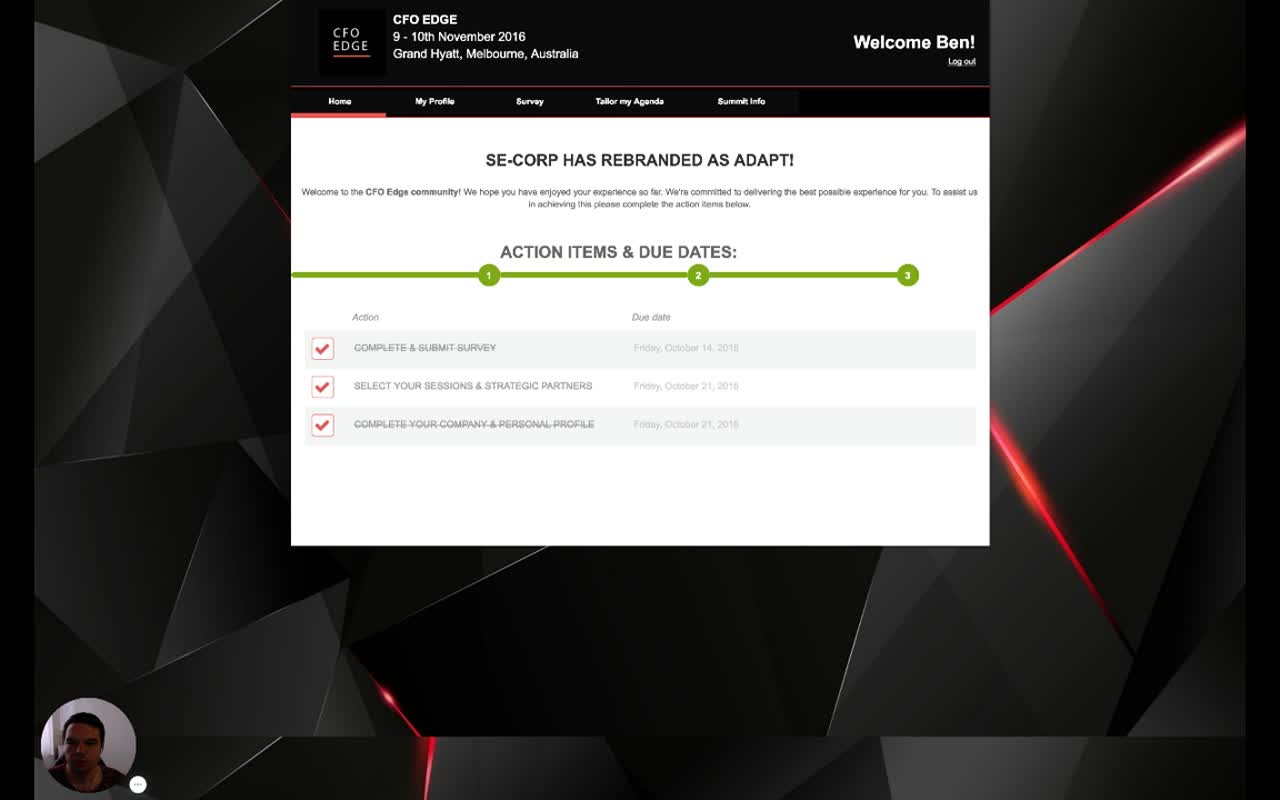
Delegate home page with event header, top nav, welcome copy and a 3-step Action Items & Due Dates checklist all marked done
Delegate home. Event header (name, dates, venue), personalised greeting (Welcome Ben!), top nav (Home, My Profile, Survey, Tailor my Agenda, Summit Info), welcome copy, then a step-progress strip and the action-item checklist with due dates: Complete & Submit Survey, Select Your Sessions & Strategic Partners, Complete Your Company & Personal Profile.
Narrator · 00:58 – 01:25 You can see all of them are currently marked as done — this delegate has submitted their information. With the mouse over you can see information about each step and what they should be doing.
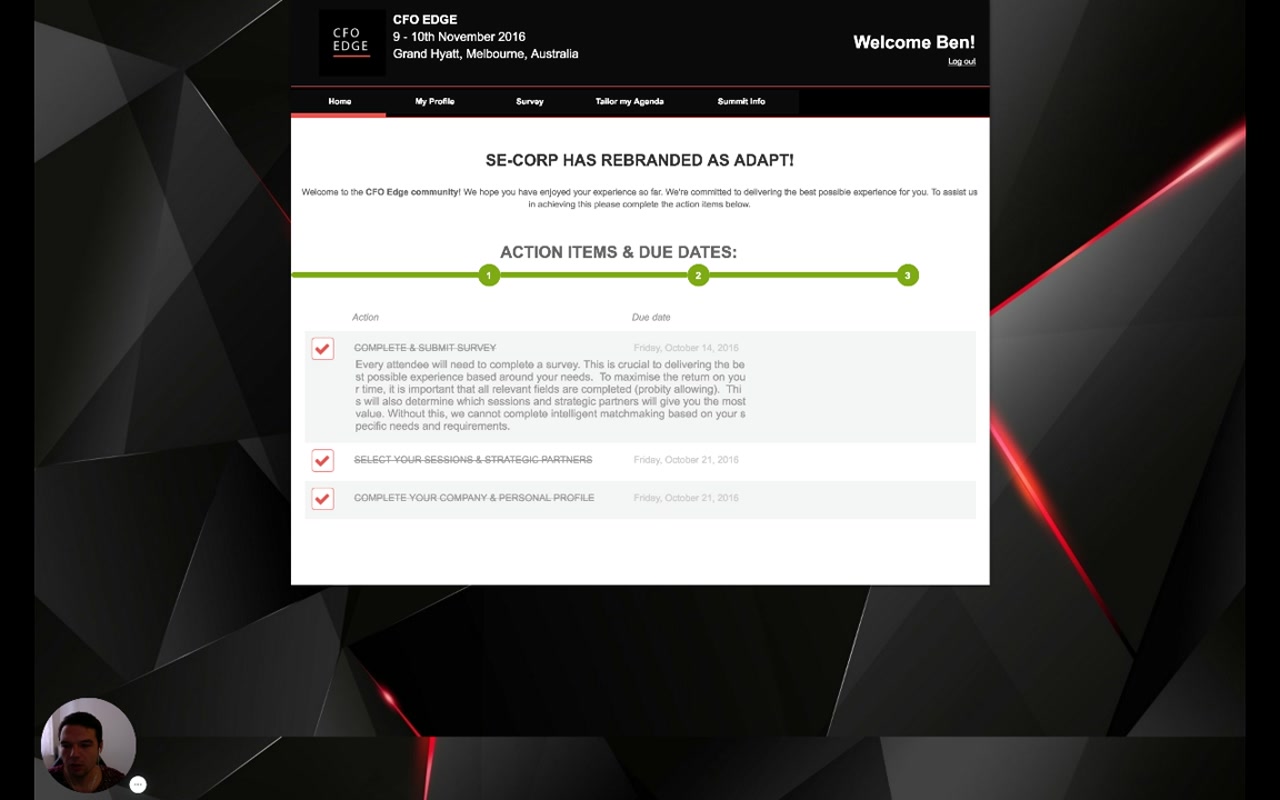
Action item expanded on hover with the explanation copy from the organizer
Action item with hover description. Hovering over Complete & Submit Survey reveals the rich-text Explanation that the organizer wrote in the Event Plan editor (Module 3): "Every attendee will need to complete a survey. This is crucial to delivering the best possible experience based around your needs… without this, we cannot complete intelligent matchmaking based on your specific needs and requirements."
How this maps back to Module 3
The action items on the home page are the steps you defined in the Event Plan, scoped to this attendee type. The hover description is the Explanation field. The due date is the Due Date field. Pages enabled in the top nav are the result of the per-attendee-type page selection. The home is just the rendering layer.

3. My Profile — Personal & Company Data 01:00 – 01:25

Photos, contact details, biography, and event-logistics fields all in one place.

Selecting My Profile in the top nav opens the delegate's editable profile. Per the narrator: "this is where all the information is listed — company information, personal information, images, and other things related to their personal data: accommodation, gala dinners, job titles, and other information."
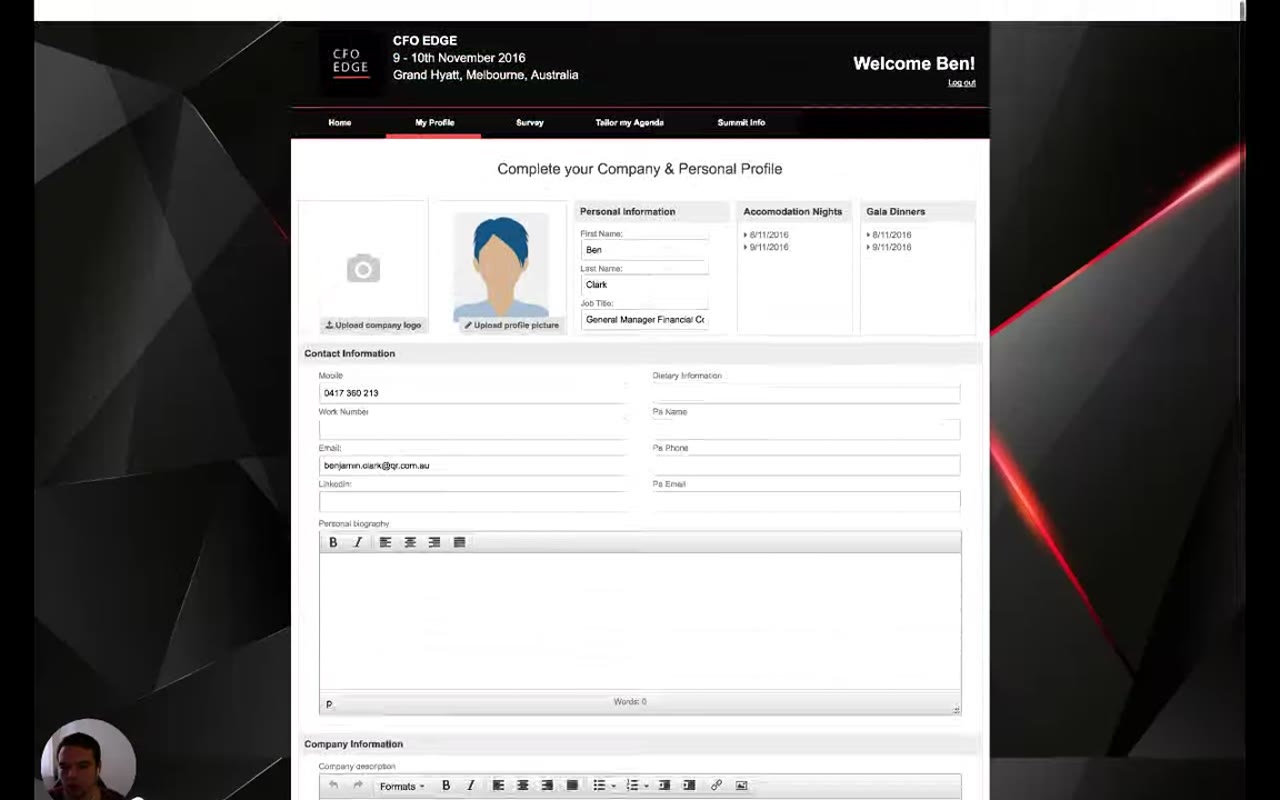
My Profile editor with company logo upload, profile picture, personal information, accommodation nights and gala dinners panels, contact information, personal biography
My Profile. Top row: Upload company logo, Upload profile picture, Personal Information (First/Last name, Job Title), Accommodation Nights (per-night dates), Gala Dinners (per-night dates). Below: Contact Information (Mobile, Work Number, Email, LinkedIn, Dietary Information, PA Name/Phone/Email), Personal biography rich-text editor, then a Company Information section underneath.

4. Survey — Driving the Matchmaking 01:25 – 01:54

The survey is the input that the matching engine uses for everything else.

Narrator · 01:25 – 01:54 As soon as their profile is finished, the organizer usually goes to the next step — enabling the survey, which is crucial to be able to schedule the meetings and organize their itinerary. There are all of these questions, as you saw through the previous session — they have all the forms and questions defined by the organizer, dynamic and related to the particular event.
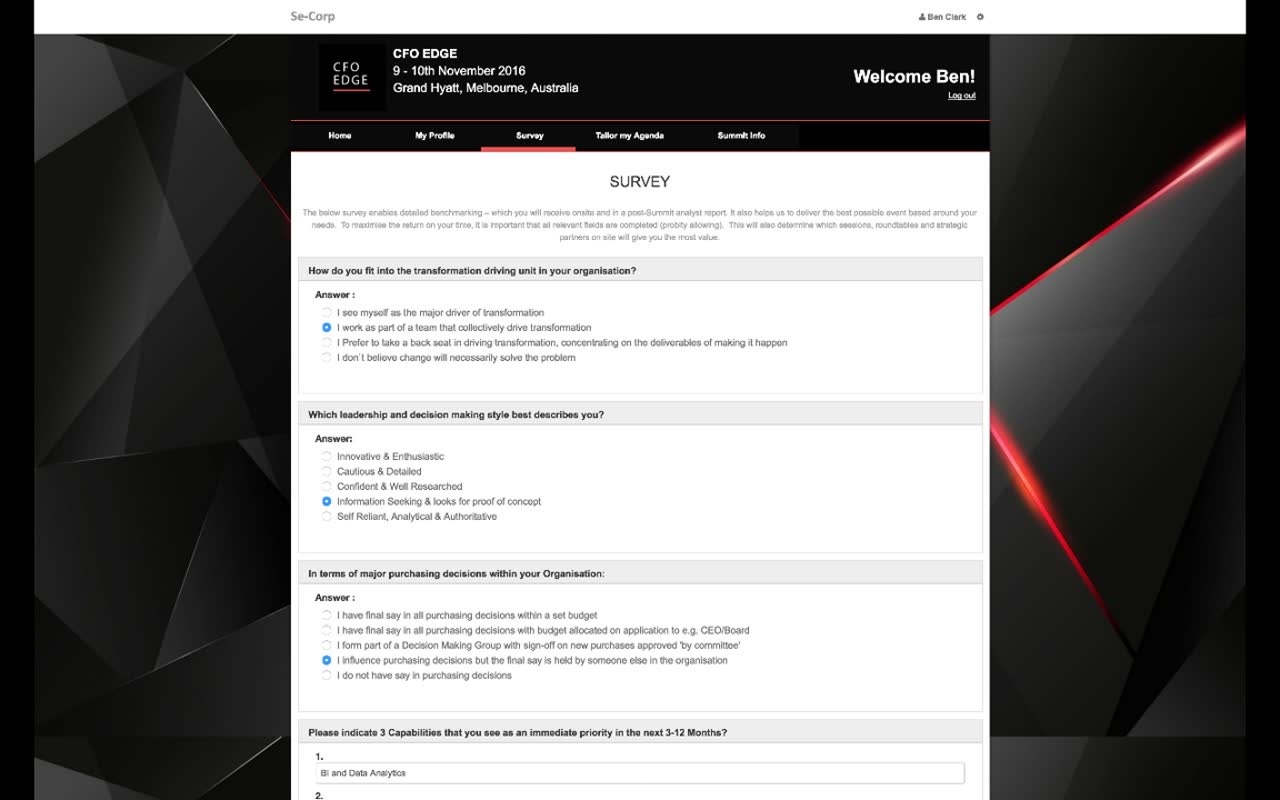
Delegate survey page with multi-section questions: transformation driving unit, leadership style, purchasing decisions, and 3 capabilities priority
Survey. Page intro: "The below survey enables detailed benchmarking — which you will receive onsite and in a post-Summit analyst report. It also helps us deliver the best possible event based around your needs." Examples of question types: How do you fit into the transformation driving unit in your organisation? (radio), Which leadership and decision making style best describes you? (radio), In terms of major purchasing decisions within your Organisation (radio), Please indicate 3 Capabilities that you see as an immediate priority (3 text inputs).

5. Investment Priorities — Hierarchy of Objectives 01:54 – 02:30

A weighted ranking of what matters most — fed straight into the auto-scheduler.

Narrator · 01:54 – 02:30 At the end there is a very important section about their priorities, the main objectives of the event — in this case it's called investment priorities. There is a hierarchical view of what is important and what their tasks and objectives are when they are at the event. This questionnaire is very important because we use it to weight and manage the automated scheduling afterwards.

The Investment Priorities section is a structured, ranked list at the end of the survey. Each item has a weight; the higher-priority items pull harder when the matching engine decides what to surface to the delegate (sessions, partners, 1-to-1 slots).

Narrator · 02:30 – 03:00 It is an important step to fill in because it guarantees the meetings we schedule will be more focused, and the suggestions we give for the sessions are relevant to their needs.

6. Tailor My Agenda — Sessions with Interest Match 02:30 – 03:45

Pick keynotes and roundtables; the platform shows a calculated match score for each.
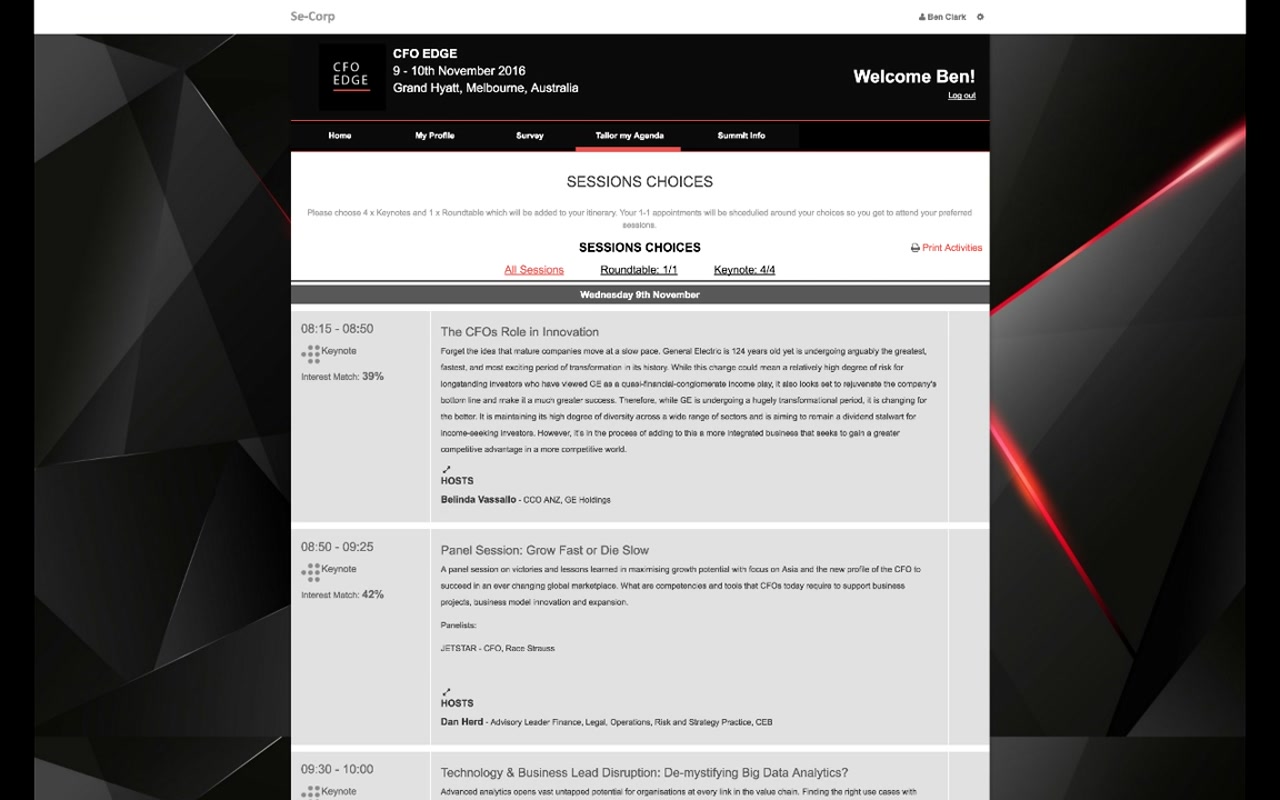
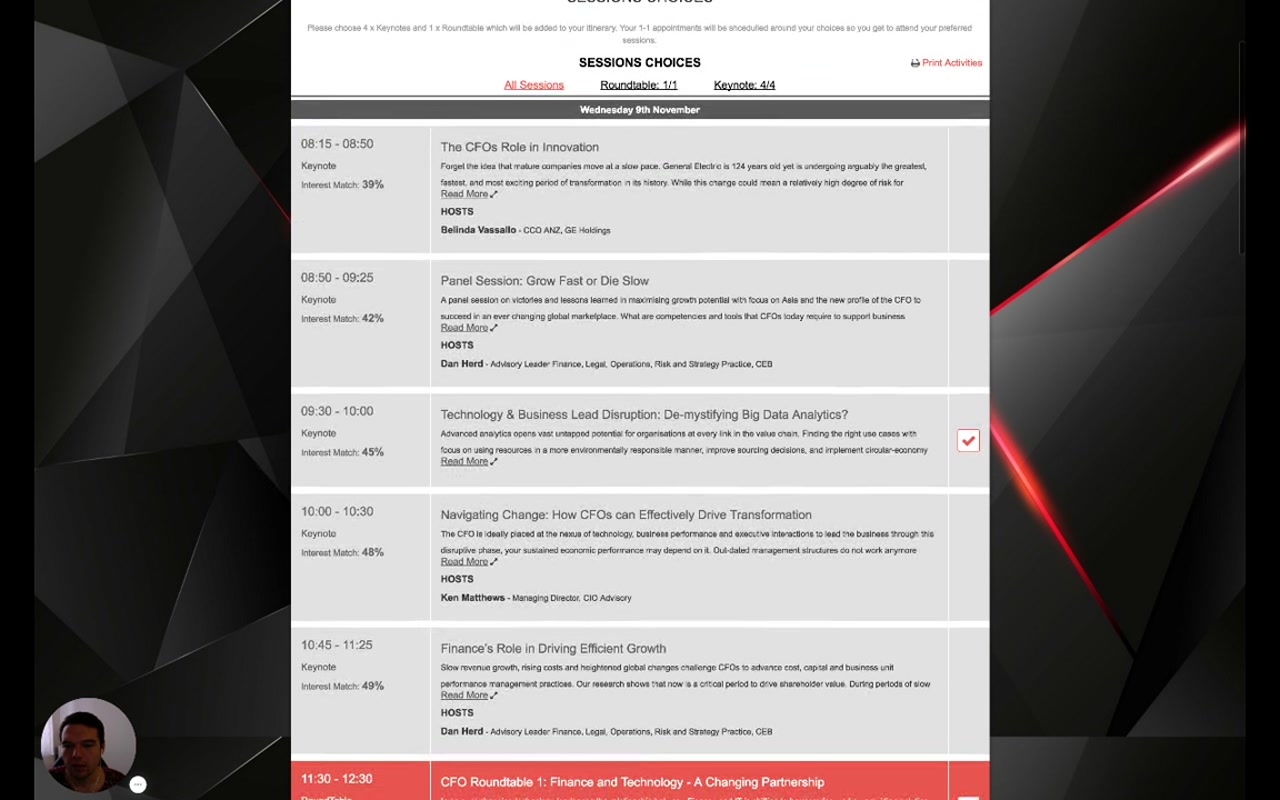
Tailor my Agenda — Sessions Choices with quotas (Roundtable 1/1, Keynote 4/4) and a list of sessions with interest match percentages
Sessions Choices header. Instructions: "Please choose 4 x Keynotes and 1 x Roundtable which will be added to your itinerary. Your 1-1 appointments will be scheduled around your choices so you get to attend your preferred sessions." Live counters show Roundtable: 1/1 and Keynote: 4/4. Print Activities button on the right.
Session list with time, type, Interest Match percentage, title, description, hosts, and a tick for selected sessions
Session list with interest match. Each session shows time, type (Keynote / RoundTable), Interest Match % (calculated from the survey), title, brief description with Read More, and hosts. The 09:30 Big Data Analytics session is selected (red tick on the right). Match percentages here range from 36% to 49%.
Narrator · 03:00 – 03:45 You can see percentages of interest match given by the system based on how the sessions are defined. You can see who hosts, who are the speakers; if you click Read More it will give more information. If you click on a particular session it gives a detailed overview, who is attending and the speakers. If they have multimedia information it will be presented here. And if the organizer has enabled the chat feature, they can have a group discussion on the given topic.

7. Selecting Strategic Partners 03:45 – 04:45

Pick the partners (sponsors) you want to meet — the engine will try to honour both sides' picks.
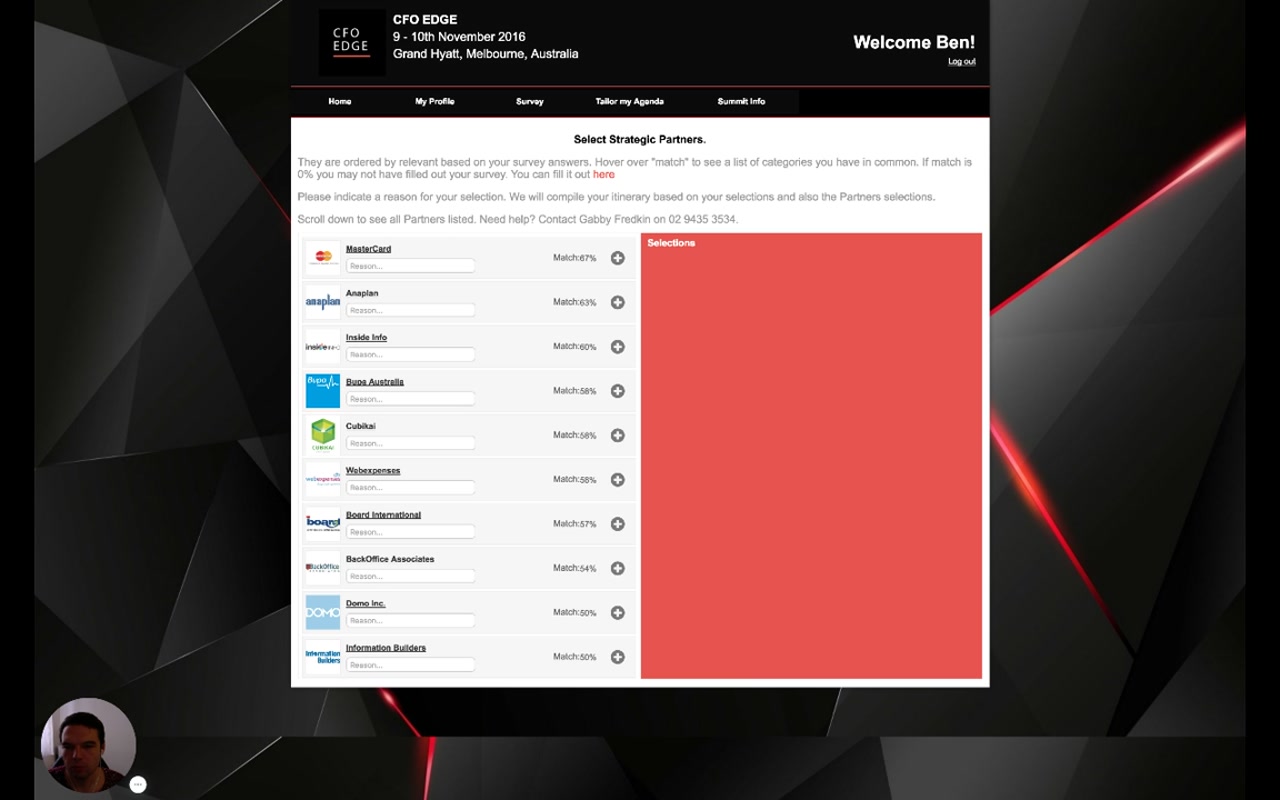
Select Strategic Partners — partner cards with logos, match percentages, reason text inputs, plus buttons; empty Selections panel on the right
Select Strategic Partners. Page intro: "They are ordered by relevance based on your survey answers. Hover over match to see a list of categories you have in common. If match is 0% you may not have filled out your survey." Partner cards show logo, name, match %, reason text input, and a + button to add to the right-hand Selections panel.
Narrator · 03:45 – 04:45 They do their selections, like they are already done here. The next step is setting their priorities — with whom they would like to meet. Again there is the matching algorithm — this is like 58% match — and it gives an overview of why it is like that. So they can select with whom they would like to meet. If they click plus or say "good to meet" and again plus, this all goes into the system and automatically enables us as organizer to do the proper matching based on their selections.
Why this is two-sided
The delegate picks partners; in Module 6 the sponsor picks delegates. The matching engine reconciles both sides — a mutual pick is a near-guaranteed meeting, a one-sided pick is weighted but contestable. That is what makes the platform "hosted buyer" rather than just a registration tool.

8. Summit Info & Itinerary Printout 04:45 – 05:00

Logistics page now; printable personalised itinerary once matching has run.

Narrator · 04:45 – 05:00 The final step at this stage will be to see some information about the summit — if there is multimedia and so on, it will be presented here. When the matching is done it will have another option, a print-out of the itinerary, for them to take and deliver during the event.

Summit Info is the logistics surface — venue details, multimedia content, and any other information the organizer wants delegates to read before they arrive.

Once the organizer has run matchmaking (covered in Module 9), the same client panel exposes the delegate's printable itinerary: every meeting, who they are meeting, where, and at what time. Delegates use this on-site to navigate their day.

9. Essence & Takeaways

The one-paragraph version

The delegate client panel is a five-tab personalised web app: Home (welcome + action-item checklist with hover descriptions and due dates that mirror the Event Plan in Module 3), My Profile (personal + company data, photos, accommodation, gala dinners, contact details, biography), Survey (dynamic forms whose answers feed the matching engine, ending with a hierarchical Investment Priorities section that weights the auto-scheduler), Tailor my Agenda (pick the required number of keynotes and roundtables — each with an Interest Match % calculated from the survey — with details, hosts, multimedia, and an optional chat feature) and Summit Info (logistics + multimedia + the printable personalised itinerary once matchmaking has run). A separate Select Strategic Partners step lets the delegate pick which sponsors they want to meet (each with a match % and a reason field) — the input on the delegate side of the two-sided matchmaking process.

Use this page as the basis for…
  • A delegate-facing onboarding email explaining "what you'll see when you log in".
  • A QA checklist when launching a new event (every tab listed here must be wired correctly per the Event Plan).
  • A reference for the team designing the next iteration of the attendee experience.
  • Sales material describing the "hosted buyer" experience from the buyer's point of view.

10. Full Transcript

Verbatim narration provided alongside the video.

Show / hide transcript
00:00 – 00:25
In this portion we are going to review the client panel or section on the web where delegates and sponsors log in to fill in their profile, their survey and tailor their agenda and then get some information about the event.
00:25 – 00:58
And when everything is finished and the meetings are scheduled, they will have also access to their final itinerary. So logging in to this panel gives—for what we are now in the role of a delegate—an overview about the event location, greeting them, and then the first thing they see on their home page into the panel is information about the event and also the action steps which we previously discussed about the deadlines and dates—what they should be doing into a given period of time.
00:58 – 01:25
So for example, you can see that all of them are currently marked as done, which means that this delegate has submitted their information. But with the mouse over you can have information about the steps they are and what they should be doing. So from here, if they go to their profile, this is where all the information is listed like their company information, their personal information, images and other things related to their personal data about the accommodation, if they have gala dinners and stuff like that, their job titles and other information.
01:25 – 01:54
And as soon as their profile is finished, usually organizer goes to the next step and that is enabling the survey which is a crucial to be able to schedule the meetings and organize their itinerary. So there are all of these questions as you may have been reviewed through the previous session—they have all the forms and questions that are defined by the organizer which are dynamic and that are related to the particular event.
01:54 – 02:30
So at the end there is a very important section about their priorities, main objectives of the event, like in this case it's called investment priorities. And then there is in a hierarchical view what are their importance and what are their important tasks and objectives when they are at the event. This questionnaire is very important because we use that to weight and also to manage the automated scheduling afterwards.
02:30 – 03:00
So that is important step to be filled in because that guarantees that the meetings we are going to schedule will be more focused and also the suggestion we give for the sessions are relevant to their needs. After the survey is completed we go to the next step and that is tailor their agenda. They can see important statistics on the top like how many round tables they can select—so you can see there's 1 of 1—and how many keynotes they have. If they want to print it out they can have a printout.
03:00 – 03:45
And you can see percentages of interest match given by the system based on how the sessions are defined and what are the percentages. You can see who hosts, who are the speakers, if you click read more it will give you more information. If you click on a particular session it will give a detailed overview of things and then who is attending and the speakers. If they have multimedia information that will be presented here. And if the organizer has enabled the chat feature, they can also have a group discussion on the given topic.
03:45 – 04:45
So from here they do the selections like they are already done here. And the next step would be setting their priorities as with whom they would like to meet. Again there is the matching algorithm which says that this is like 58% match and it gives also an overview why it is like that. So from here they can select with whom they would like to meet. So if they click plus or they say "good to meet" and again plus, then this all goes into the system and it automatically enables us as organizer to do the proper matching based on their selections.
04:45 – 05:00
So the final step at this stage will be to see some information about the summit, if there is multimedia and stuff like that it will be presented here. And when the matching is done it will have another option which will be print out of the itinerary for them to take that and print and deliver that with them during the event.