Sponsor Client Panel & Selection of Priorities
The same client-panel shell as Module 5, viewed by a sponsor. The difference is what they configure: a company with multiple representatives instead of a single profile, sponsor-specific survey forms, and — most importantly — a "Select Your Delegates" step where the sponsor picks who goes onto each of their tables, with priority tiers and a per-delegate match score.
1. Same Shell, Different Tenant 00:00 – 00:25
The sponsor sees the same architecture as the delegate — but with sponsor-specific surfaces.
Narrator · 00:00 – 00:25 Now we are logged in as a sponsor and you can see the dashboard is pretty similar. The main difference is the action steps on the top, and that this is a placeholder for the logo and the name of the company that's attending. From here, if they go to their profile, the difference is that they have — as you have probably noticed — the company details on the top.
The sponsor sees the same kind of home page as the delegate (header, top nav, action items, content sections), but the platform swaps in sponsor-specific content at every layer: a package/benefits panel on the home, a company profile with representatives, sponsor-only survey forms, and a different selection step (delegates instead of partners).
Delegate (Module 5)
- Personal profile
- Delegate-specific survey
- Selects sessions
- Selects which partners they want to meet
Sponsor (Module 6)
- Company profile + multiple representatives
- Sponsor-specific survey
- Selects sessions (later)
- Selects which delegates they want to meet, by table and priority tier
2. Home — Package Details & Action Items 00:00 – 00:25
The sponsor home opens with the deliverables of their package — what they paid for, what they get.
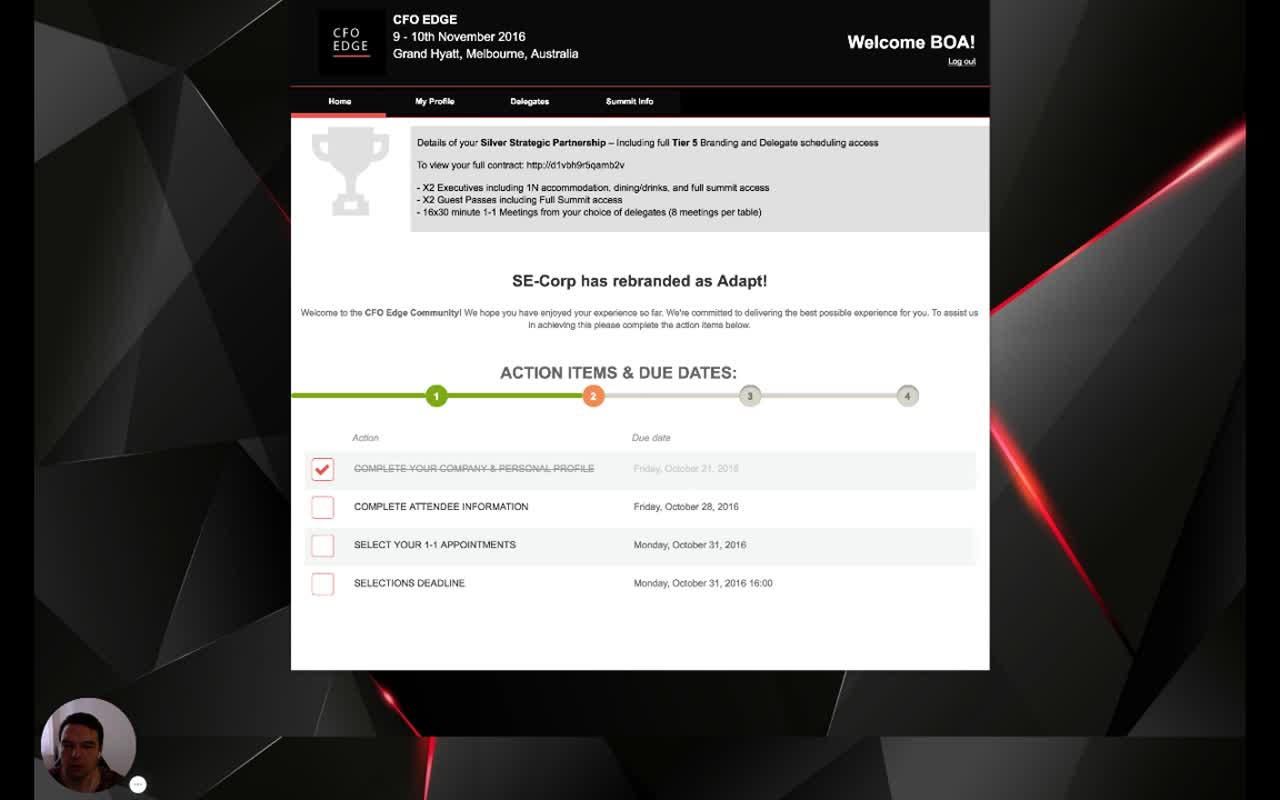
The action items mirror what the organizer set in the Event Plan (Module 3) but with sponsor-specific labels and dates — including the hard Selections Deadline that gates when the matching engine can run.
3. My Profile — Company & Representatives 00:25 – 00:54
A sponsor isn't a person — it's a company plus a list of representatives.
Narrator · 00:25 – 00:54 Then there are representatives who are coming on behalf of that company. They can provide their information, their photos and their details as well. As you can see, the forms are a bit different because they were defined only for the sponsors or the partners. So as soon as they complete their profile, they go to the survey.
The sponsor profile page is structured top-to-bottom as:
- Company details — the sponsoring company itself: name, logo, address, contract / partnership info.
- Attendee profiles — one per representative attending. Each gets the same kind of fields a delegate has on their personal profile (photo, name, job title, biography), but multiple of them per company. The number is determined by the package (e.g., X2 Executives).
4. Survey — Sponsor-Specific Forms 00:54 – 01:13
The sponsor's survey is a different set of forms — the ones the organizer assigned to the partner attendee type.
Narrator · 00:54 – 01:13 Their survey is again dynamic, based on the questions defined by the organizer. At the end, they have all these sections, and when they finish that, they click save and the survey is completed.
This is exactly the architecture covered in Module 2 — forms are built once in the Event Forms library and assigned to attendee types. A delegate sees the delegate-tagged forms; a sponsor sees the sponsor-tagged forms. The platform takes care of the swap.
5. Select Your Delegates — The Sponsor Side of Matchmaking 01:13 – 01:54
The sponsor's defining moment: pick which delegates go on each of their tables, in priority tiers.
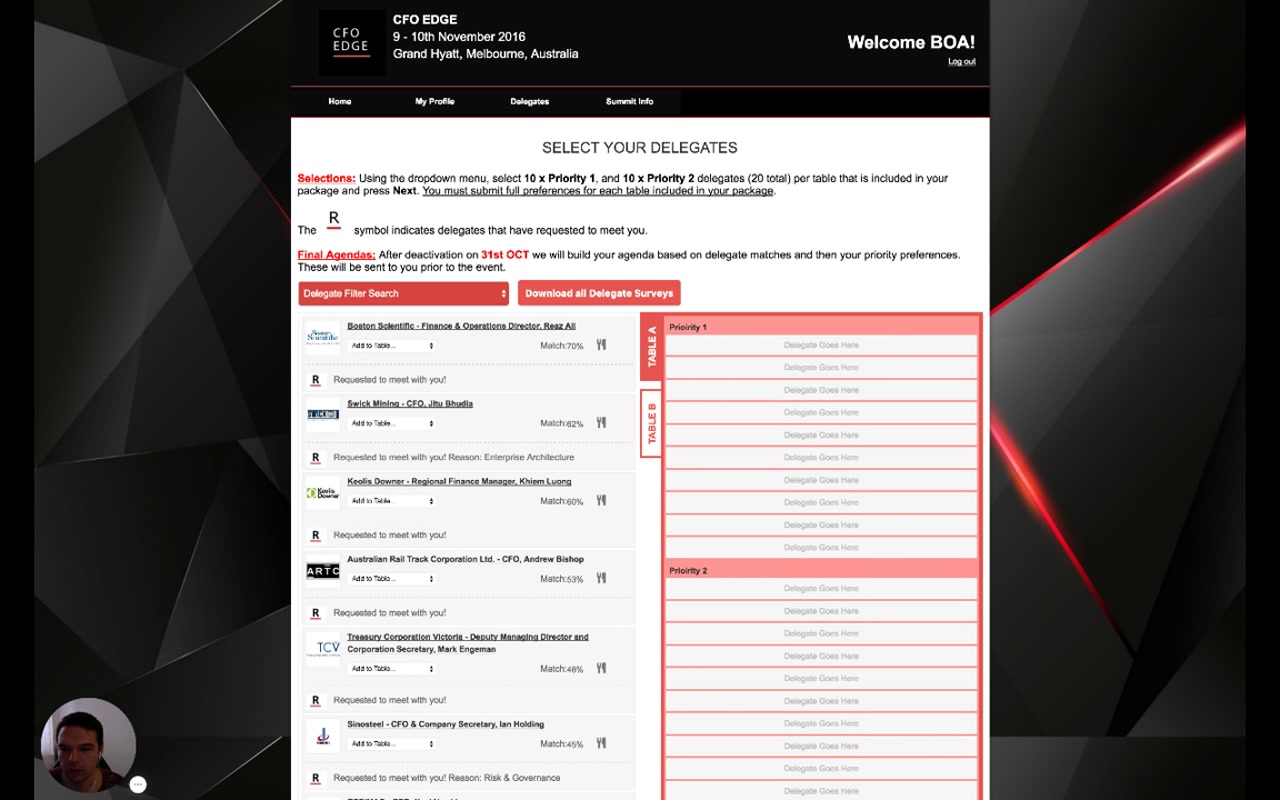
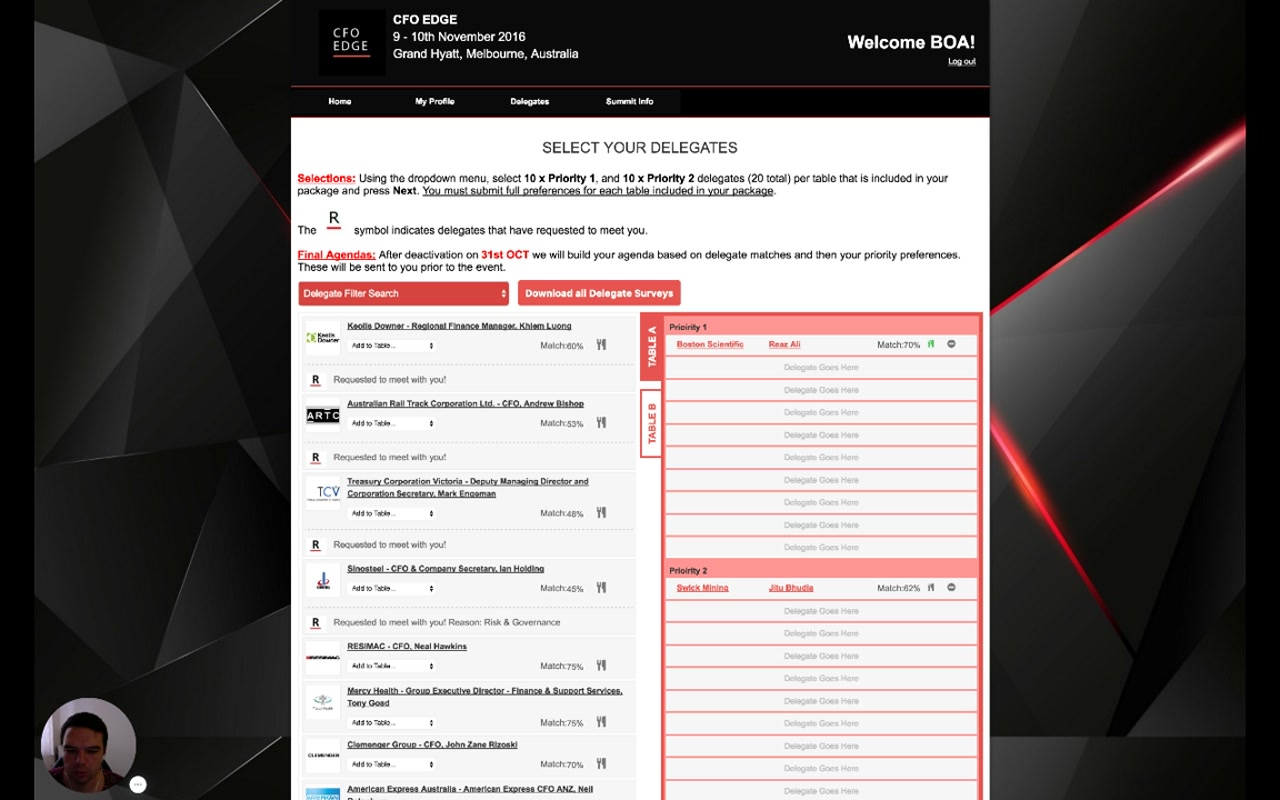
Narrator · 01:13 – 01:54 The next thing which is very important is with whom they would like to meet. For sponsors it's slightly different — they select their delegates. This is the matching, which says with whom they have a match based on their preferences. They have a choice — for what you see on the right — they can select their priorities 1 and their priorities 2. As soon as they click on that, it's, for example, priority 1. This information is processed by the system to do the best possible matching afterwards.
| Concept | What it does |
|---|---|
| Tables | Each table the package includes (Table A, Table B…) gets its own set of priority slots. Sponsors with bigger packages get more tables. |
| Priority 1 / Priority 2 | Two tiers per table. The example needs 10 Priority 1 + 10 Priority 2 delegates per table = 20 picks per table. |
| Match % | Per-delegate match score from the sponsor's survey vs the delegate's survey. Helps the sponsor choose. |
| "R" badge | Delegate has requested to meet this sponsor — strong signal for a mutual match. |
| Add to Table… | The actual selection control: pick a table + tier and the delegate moves into the right-hand panel. |
| Final Agendas | Per the page text: "After deactivation on 31st OCT we will build your agenda based on delegate matches and then your priority preferences. These will be sent to you prior to the event." |
6. Filtering & Per-Delegate Detail 01:54 – 02:54
Inspect any delegate before deciding; filter the long list down to who matters.
Narrator · 01:54 – 02:22 For each of these participants, if they click read more, they can have information about why it is matched like that — the services and products. They can see information about the person who is coming, the company, and they have an option to see the survey provided by the attendee. So this information is very important for the sponsors in order to decide with whom they would like to meet.
Narrator · 02:22 – 02:54 They can also use the filter to filter on particular categories or properties — for example by industry or job title. Then they select their delegates. They mark them, and as soon as they reach their total amount of selections, they are given a message that they have fulfilled their selections. Everything then is ready for the meeting scheduling to take place.
Per-delegate detail exposes the matchmaking signals up front: the matched services and products, the delegate's profile (job, company), and the delegate's full survey response. The filter on top (Delegate Filter Search dropdown) lets the sponsor narrow the list by industry, job title, or any survey property — useful when you have hundreds of delegates and only need to make 20 picks per table.
The platform tracks selection counts and shows a completion message once the sponsor has filled both priority tiers for every table. That's the trigger that the sponsor's input is ready for matchmaking.
7. Tailor Agenda & Summit Info 02:54 – 03:22
Sponsors also pick sessions — same agenda mechanics as delegates.
Narrator · 02:54 – 03:22 From here, they also can tailor their agenda. Again, depending on the round tables defined and the keynote sessions, they select which ones they would like to attend. They will be presented with a match based on their survey and priorities. So they select their sessions.
The agenda step works the same way it does for the delegate (Module 5 §6) — quotas at the top (e.g., Roundtable: 1/1, Keynote: 4/4), a list of sessions with an Interest Match % calculated against the sponsor's own survey, and a tick to add a session to the sponsor's itinerary.
Summit Info is the same logistics surface as for the delegate.
8. The Final Itinerary 03:22 – 03:55
Once matchmaking has run, the sponsor sees their full schedule — meetings, room, time.
Narrator · 03:22 – 03:40 Then they have the summit info — for anything you find suitable to be presented to them — and the print-out of the itinerary. As you can see, this sponsor already has their schedule because we already ran the scheduling. So they can see with whom they are meeting, where it's taking place, and at what time.
Narrator · 03:40 – 03:55 So this is a full itinerary of a sponsor on a given event.
The itinerary view is the output of the entire two-sided machine: delegate priorities + sponsor priorities + agenda choices + session-type rules + room calendar → a personalised schedule per sponsor representative, printable and downloadable for use on-site.
9. Essence & Takeaways
The one-paragraph version
The sponsor client panel mirrors the delegate panel architecturally but plays a different role. It opens with a package & benefits panel showing the sponsor what they bought (executives, guest passes, 1-1 meeting count, tables) and a 4-step action-item checklist that ends in a hard selections deadline. Profile is a company + multiple representatives, not a single person. The survey is the sponsor-tagged form set. The defining step is Select Your Delegates: per table, the sponsor picks 10 Priority 1 + 10 Priority 2 delegates, with a match % per delegate, an "R" badge for delegates who have already requested them, a per-delegate detail view (services and products matched, full delegate survey), and a filter to narrow the list. Once both sides — delegate (Module 5) and sponsor (Module 6) — have submitted, the matchmaking engine builds the final itinerary per sponsor representative, viewable and printable from the same client panel.
- Sponsor onboarding documentation explaining "what to do once you log in."
- Sales material for prospective sponsors: how the package contents (executives / passes / tables / 1-1s) translate into actual platform affordances.
- A QA checklist for the sponsor flow when launching a new event (each section listed here must be wired correctly per the Event Plan and form library).
10. Full Transcript
Verbatim narration provided alongside the video.